
What Is Digital Literacy? Meaning, Skills, Examples, and Why It Matters
What Is Digital Literacy? Meaning, Skills, Examples, and Why It Matters
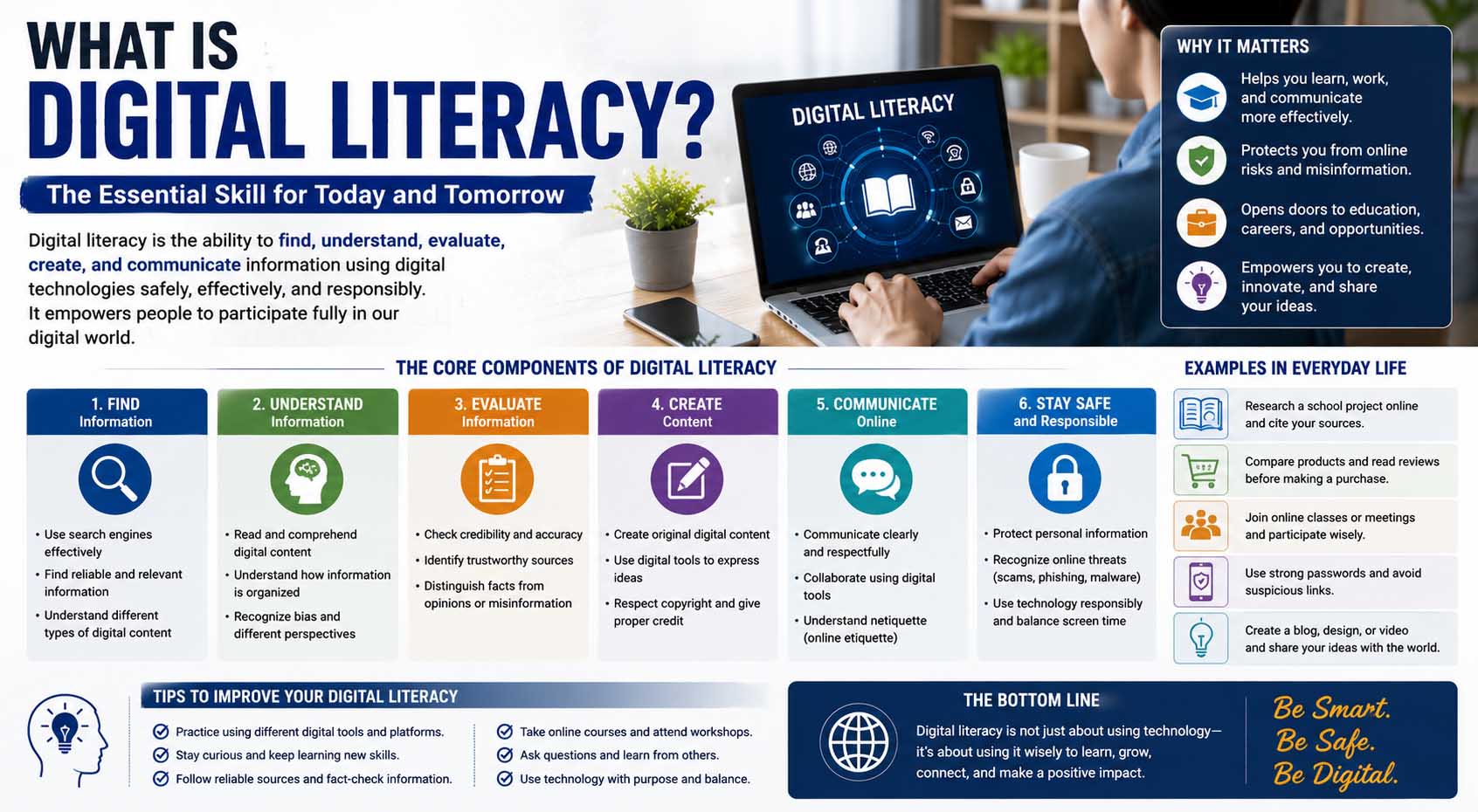
Students use technology for research, assignments, communication, entertainment, and everyday problem-solving, but knowing how to operate a device is only part of being digitally capable. So, what is digital literacy? Digital literacy is the ability to use digital technologies effectively, find and evaluate information, communicate appropriately, create digital content, protect personal information, and make thoughtful decisions in online environments.
A digitally literate person does not need to be a programmer or technology expert. Instead, the goal is to understand how to use common digital tools responsibly and recognize when online information may be unreliable, misleading, unsafe, or inappropriate for a particular task.
For students, these skills now support everything from completing homework to preparing for college and future careers.
What Is Digital Literacy in Simple Terms?
Digital literacy means having the knowledge and practical skills needed to use computers, smartphones, websites, apps, online information, and other digital resources effectively.
However, simply knowing how to open an app or search the web does not automatically make someone digitally literate.
For example, imagine two students searching online for information about climate change. Both know how to use a search engine. However, the first student clicks the first result and copies information without checking it. Meanwhile, the second compares several sources, identifies who published them, checks when they were updated, and cites reliable evidence in an assignment.
Both students can use technology, yet the second demonstrates stronger digital literacy.
Therefore, answering what is digital literacy? requires looking beyond basic device skills. It includes critical thinking, communication, information evaluation, creativity, privacy awareness, and responsible online behavior.
Digital Literacy in Education
When discussing digital literacy in education, the focus is on helping students use technology as a meaningful learning tool rather than simply giving them access to devices.
A digitally literate student might know how to:
- Research a topic online
- Compare multiple information sources
- Create a digital presentation
- Collaborate on a shared document
- Communicate appropriately through email
- Recognize misleading information
- Protect account credentials
- Organize digital files
- Cite online sources
- Use educational platforms effectively
These abilities can support learning across almost every school subject.
For instance, students reading online textbooks need to recognize headings, menus, captions, hyperlinks, charts, and interactive elements. Understanding different types of text features can therefore help learners navigate both printed and digital educational material more efficiently.
For a broader educational perspective, UNESCO explains how digital competencies support learning and participation in increasingly digital environments.
Core Digital Skills Students Need
Digital literacy combines several abilities rather than one specific skill.
Finding Information Efficiently
Searching effectively means knowing how to turn a question into useful search terms.
Suppose a student needs information about renewable energy. Searching only “energy” may produce millions of broad results. However, a more specific search such as “advantages of solar energy for homes” narrows the topic.
Students should also learn that the first search result is not automatically the best source.
Instead, they should compare information and decide whether it actually answers their question.
Evaluating Online Sources
Finding information is easy. Deciding whether it deserves trust requires more thought.
Before using a webpage for schoolwork, students can ask:
- Who created the information?
- What organization published it?
- Is the author qualified to discuss the subject?
- When was the page published or updated?
- Does the page provide evidence?
- Can the main claims be confirmed elsewhere?
- Is the purpose to inform, persuade, entertain, or sell?
This process becomes especially useful when researching unfamiliar subjects.
Meanwhile, students can use graphic organizers for reading comprehension to compare claims, evidence, sources, and key ideas gathered from several digital texts.
Communicating Online
Digital communication includes email, classroom platforms, video calls, discussion boards, messaging tools, and shared documents.
Students should understand that communication style depends on context.
A quick message to a friend may be informal. In contrast, an email to a teacher, college, or employer usually needs a clear subject, appropriate greeting, complete sentences, and respectful tone.
Therefore, digital literacy includes knowing not only how to send a message but also how to communicate appropriately.
Creating Digital Content
Students increasingly create rather than simply consume digital information.
Examples include:
- Presentations
- Documents
- Videos
- Podcasts
- Infographics
- Spreadsheets
- Digital portfolios
- Websites
Strong digital skills help students choose the right format for the purpose.
For example, a spreadsheet may work well for organizing numerical data, whereas a presentation may communicate research findings more clearly to a class.
Digital Literacy vs. Computer Literacy
Digital literacy and computer literacy overlap, but they are not identical.
Computer literacy generally focuses on using computer hardware and software. For instance, it may include opening files, typing documents, installing applications, or using basic software features.
Digital literacy is broader.
| Skill | Computer Literacy | Digital Literacy |
|---|---|---|
| Using a keyboard | Yes | Yes |
| Opening software | Yes | Yes |
| Searching online effectively | Sometimes | Yes |
| Evaluating online information | Limited focus | Yes |
| Understanding online privacy | Limited focus | Yes |
| Creating digital content | Often | Yes |
| Recognizing misinformation | Usually not central | Yes |
| Communicating responsibly online | Sometimes | Yes |
Therefore, computer skills form part of digital literacy, but digital literacy also requires judgment and critical thinking.
Understanding Digital Media Literacy
People sometimes ask what is digital media literacy because online media has become a major source of news, entertainment, advertising, and educational information.
Digital media literacy is the ability to access, understand, evaluate, and create media through digital platforms.
For example, a student watching a short video that makes a surprising scientific claim should not automatically assume that the claim is accurate because the video looks professional.
Instead, the student can ask who produced it, whether the creator provides evidence, whether important context is missing, and whether reputable sources support the claim.
The same principle applies to social posts, advertisements, edited images, podcasts, news articles, and AI-generated material.
Because online content comes in many formats, students benefit from practicing different types of reading, such as close reading for detailed information and scanning when searching quickly for a particular fact.
Digital Literacy and Reading Skills
Traditional reading skills remain valuable in online environments.
Students still need to understand sentences, vocabulary, main ideas, evidence, and arguments. However, digital reading introduces extra decisions.
For example, a webpage may contain menus, advertisements, pop-ups, hyperlinks, videos, charts, and recommendations alongside the main text.
As a result, readers must decide what deserves attention and what they can ignore.
Likewise, unfamiliar terminology can make online research difficult. Instead of immediately abandoning a useful source because it contains hard vocabulary words, students can check definitions, use surrounding context, and compare explanations from reliable educational resources.
Younger learners may also need strong foundational skills before they can comfortably process complex online text. Understanding what is decoding in reading helps explain how recognizing written words differs from evaluating the meaning and reliability of digital information.
Online Safety and Privacy Skills
Responsible technology use also requires basic cybersecurity awareness.
Students should learn to create strong, unique passwords and avoid sharing them with other people. Where available, multi-factor authentication can provide another layer of account protection.
They should also recognize common warning signs of suspicious messages.
For example, a message that creates extreme urgency, asks for a password, or directs the recipient to an unfamiliar login page deserves caution.
Privacy matters as well.
Before posting photographs, locations, school details, or personal information, students should consider who may be able to see or save that content.
Even when a platform provides privacy controls, users should avoid assuming that anything posted online will remain completely private forever.
Understanding Digital Health Literacy
Another related concept is what is digital health literacy, which refers to finding, understanding, evaluating, and using health information obtained through digital sources.
For example, someone may search online for information about nutrition, exercise, medications, or symptoms.
However, health information requires careful evaluation because inaccurate advice can have real consequences.
Digital health literacy may involve checking whether information comes from a reputable healthcare organization, identifying the qualifications of the author, checking publication dates, and recognizing when professional medical advice is needed.
Students should also understand the limits of online research. A webpage, social media post, or AI tool should not automatically replace qualified professional guidance for individual health concerns.
Practical Examples of Digital Literacy
Digital literacy appears in ordinary situations every day.
Consider these examples:
School research: A student compares information from several credible sources instead of copying the first search result.
Email: A student sends a clear, respectful message to a teacher and avoids sharing sensitive personal information unnecessarily.
Social media: A user checks whether evidence supports a surprising claim before reposting it.
Online shopping: A shopper checks the website, seller details, product information, return policy, and payment security before purchasing.
Group projects: Students collaborate through a shared document while organizing files and tracking changes.
Online forms: A user checks that a website is legitimate before entering sensitive information.
In each situation, technology skills matter. However, judgment matters just as much.
How Students Can Improve Their Digital Skills
Digital literacy develops through practice rather than memorizing a list of rules.
Practice Better Online Research
Choose a topic and compare three different sources.
Look at their authors, publication dates, evidence, purpose, and organization. Then, decide which source you would trust most for an academic assignment and explain why.
Learn Common Digital Tools
Students do not need to master every program.
Instead, become comfortable with basic document editing, presentations, spreadsheets, file management, email, cloud storage, and online classroom tools.
Once the underlying skills are familiar, learning a new platform usually becomes easier.
Organize Digital Files
Poor file organization can waste surprising amounts of study time.
Use descriptive filenames rather than names such as “document1” or “finalfinal2.”
For instance:
Biology_Cell_Project_Draft
This name is much easier to recognize later.
Folders organized by subject, semester, or project can also keep schoolwork manageable.
Check Before You Share
Before sharing online information, ask one simple question: “Do I know this is accurate?”
If not, check the original source.
As a result, this habit can reduce accidental sharing of misleading information and encourage more thoughtful digital participation.
Common Digital Literacy Mistakes
One frequent mistake is assuming that popularity equals reliability.
A post can receive thousands of likes and still contain inaccurate information.
Another mistake is trusting professional-looking design. A polished website can still publish weak or misleading content, while a visually simple page may contain excellent information.
Students may also rely too heavily on one source.
Instead, comparing multiple reliable sources provides context and makes conflicting information easier to spot.
Another problem is copying online content without attribution. Therefore, students should learn when and how to cite sources, paraphrase correctly, and respect copyright requirements.
Finally, technology itself should not become the goal. Using a complicated digital tool does not automatically improve an assignment. Choose technology because it helps communicate, organize, research, create, or solve a problem.
Why These Skills Matter Beyond School
Digital literacy is not only an academic skill.
Colleges often expect students to research independently, communicate online, submit digital assignments, and use learning-management systems.
Likewise, many workplaces use email, cloud platforms, spreadsheets, video meetings, project-management tools, and shared documents.
Employees may also need to evaluate online information and recognize cybersecurity risks.
As technology changes, individual platforms will come and go. Therefore, learning how to evaluate, adapt, communicate, and solve problems matters more than memorizing the buttons in one particular application.
FAQs About Digital Literacy
What Is Digital Literacy for Students?
For students, digital literacy means using technology effectively and responsibly for learning, research, communication, content creation, collaboration, and problem-solving.
What Are Examples of Digital Literacy Skills?
Examples include online research, source evaluation, email communication, digital content creation, file management, privacy awareness, password security, and responsible social media use.
Why Is Digital Literacy Important in Education?
It helps students find reliable information, complete digital assignments, communicate appropriately, use educational tools, and prepare for college and modern workplaces.
Is Using Social Media a Digital Literacy Skill?
Using a social media app requires digital skills, but digital literacy goes further. It includes understanding privacy, evaluating posts, recognizing misleading content, communicating responsibly, and deciding what information is appropriate to share.
Is Digital Literacy the Same as Media Literacy?
No. They overlap, but digital literacy covers a wider range of technology-related abilities. Digital media literacy focuses more specifically on understanding, evaluating, and creating media through digital platforms.
Can Digital Literacy Skills Become Outdated?
Specific software features can change quickly. However, broader abilities such as evaluating information, protecting privacy, communicating clearly, and learning new tools remain useful even as technology evolves.
Building Stronger Digital Skills One Habit at a Time
Understanding what is digital literacy is easier when you think of it as a combination of technology skills and thoughtful decision-making. A digitally literate learner can find information, question its reliability, use appropriate tools, communicate clearly, create content, and protect personal information.
Students do not need to master everything at once. Instead, start with practical habits: compare sources before trusting them, organize files clearly, check information before sharing it, learn basic privacy practices, and choose digital tools that genuinely help with the task.
As those habits become routine, technology becomes more than something students simply use. It becomes a tool they can understand, evaluate, and control with greater confidence.