
Computer Literacy Meaning: Definition, Skills and Real-Life Examples
Computer Literacy Meaning: Definition, Skills and Real-Life Examples
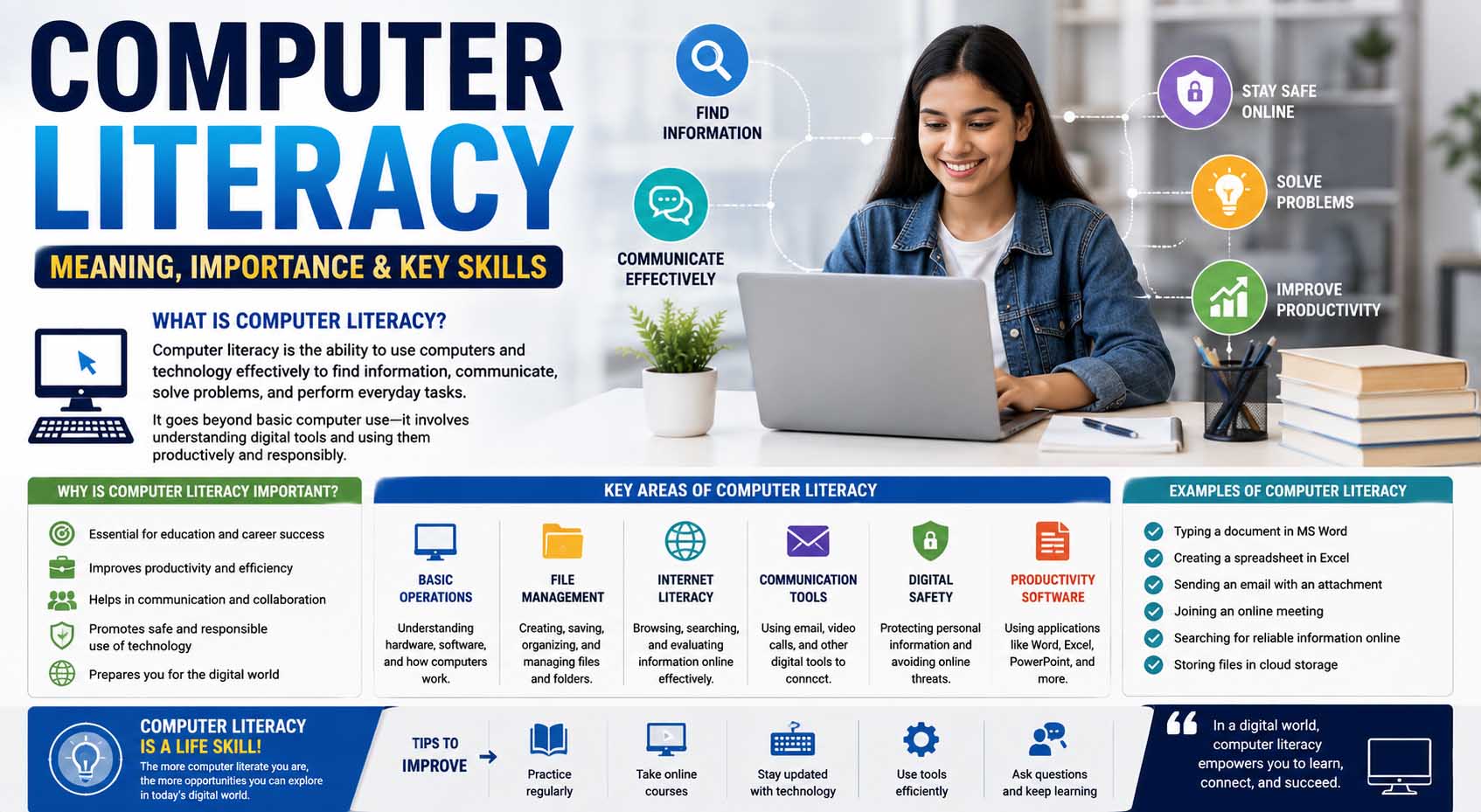
Computers are part of studying, working, communicating, and handling everyday tasks, but using technology confidently requires more than knowing how to turn on a laptop. The computer literacy meaning refers to having the knowledge and practical skills needed to use computers, software, digital tools, and online services effectively and responsibly. For a student, that might mean creating a document and submitting an assignment online. Meanwhile, in the workplace, it could include managing files, using spreadsheets, joining video meetings, or communicating through email.
Computer literacy doesn’t mean you need to know programming or understand how every part of a computer works. Instead, it focuses on practical abilities that help you complete common tasks independently. Since technology keeps changing, computer literacy also involves being willing to learn new tools as they appear.
What Is the Computer Literacy Meaning?
In simple terms, computer literacy is the ability to understand and use computers and common computer-based tools.
A computer-literate person can usually perform basic tasks without constant assistance. For example, they might create and save documents, organize files, browse the internet, send email, install or use approved applications, and solve simple technical problems.
However, computer literacy exists on a spectrum. A middle school student, office administrator, graphic designer, and software developer may all be computer literate even though their technical abilities differ greatly.
Therefore, the meaning of computer literacy should be understood in context. You need enough knowledge and confidence to use the technology required for your education, work, or everyday activities.
Computer Literacy vs Digital Literacy
Computer literacy focuses mainly on operating computers and using common software effectively. Digital literacy is broader because it also involves understanding, evaluating, creating, and communicating information through digital technologies.
For example, knowing how to open a web browser demonstrates a basic computer skill. However, judging whether a website provides trustworthy information involves a broader form of digital literacy.
Likewise, knowing how to attach a document to an email is a computer skill. Meanwhile, understanding privacy risks before sharing sensitive information requires wider digital awareness.
Students who want to understand what is digital literacy can therefore think of computer literacy as one practical part of a larger collection of skills needed to participate responsibly in technology-based environments.
Computer Literacy Skills Meaning: What Skills Are Included?
The phrase computer literacy skills meaning generally refers to the practical abilities that allow someone to use a computer efficiently.
These skills range from basic tasks to more advanced workplace abilities.
Basic Computer Operation
A beginner should understand common hardware components such as the monitor, keyboard, mouse or trackpad, speakers, webcam, and storage devices.
Likewise, users should know how to start and shut down a computer correctly, connect to Wi-Fi, adjust basic settings, and use common accessibility features when needed.
Keyboard and mouse skills matter too. Being able to type efficiently, copy and paste, select text, scroll, and use basic keyboard shortcuts can make everyday computer work much faster.
File and Folder Management
File management is one of the most useful computer skills because poor organization can quickly create confusion.
A computer-literate user should know how to create folders, save files, rename documents, move files between folders, and locate downloaded content.
Understanding common file formats also helps. For example, students may encounter PDF, DOCX, PPTX, XLSX, JPG, PNG, and ZIP files.
Cloud storage adds another layer. Therefore, learners should understand the difference between a file stored locally on a device and one stored through a cloud service.
Word Processing
Word-processing software is widely used in schools and workplaces.
Students should know how to type and edit text, format headings, adjust paragraphs, create lists, insert images, and save or export documents.
More experienced users may also work with tables, page layouts, citations, comments, and collaborative editing.
The exact software can vary. However, once you understand the basic concepts, moving between different word-processing programs becomes easier.
Spreadsheets
Basic spreadsheet knowledge can be valuable even outside accounting or mathematics.
For instance, students can use spreadsheets to organize research results, track assignments, calculate totals, or create simple charts.
Beginners should understand rows, columns, cells, data entry, and basic formulas. Later, they can learn sorting, filtering, formatting, charts, and more advanced functions.
Internet and Online Research Skills
Using the internet is easy; using it effectively takes more skill.
Computer-literate students should know how to open and manage browser tabs, use search engines, download appropriate files, upload assignments, and navigate websites.
However, finding information isn’t enough.
Students also need to evaluate what they find. Who created the information? When was it published? Does the author provide evidence? Can the claim be confirmed through another trustworthy source?
These questions help turn basic web browsing into useful academic research.
Likewise, learners should recognize advertisements, misleading download buttons, suspicious pop-ups, and websites that imitate legitimate services.
Email and Online Communication
Email remains a basic communication tool in education and professional settings.
Students should know how to compose a message, write a clear subject line, attach a file, reply appropriately, and recognize the difference between Reply and Reply All.
Professional communication also requires judgment.
For example, a message to a teacher or employer should usually be clearer and more structured than a casual text to a friend. Therefore, computer literacy includes understanding how tools should be used, not simply knowing which buttons to click.
Video conferencing has become another common skill. Users may need to join meetings, mute and unmute microphones, use cameras, share screens, participate in chat, and troubleshoot simple audio problems.
Online Safety Is Part of Computer Literacy
Knowing how to use technology without understanding basic security can create unnecessary risks.
Therefore, computer literacy should include password safety, software updates, suspicious-link awareness, and careful handling of personal information.
Users should learn to create strong, unique passwords and use multi-factor authentication when available. Meanwhile, they should be cautious when an unexpected email or message asks them to click a link, open an attachment, or provide account information.
Phishing attempts often try to create urgency. For instance, a message may claim that an account will immediately close unless the user signs in through a provided link.
Instead of reacting quickly, users should verify the request through a trusted route.
Regular backups are useful as well. Important school or work files shouldn’t exist in only one place if losing them would create a serious problem.
Why Computer Literacy Matters for Students
Students increasingly interact with technology throughout their education.
They may need to access learning platforms, conduct online research, write assignments, create presentations, collaborate on shared documents, communicate with teachers, and submit coursework electronically.
Therefore, weak computer skills can create an extra barrier even when a student understands the academic subject.
Imagine two students who both know the answer to an assignment. One can format the document, save it correctly, and upload it within minutes. Meanwhile, the other struggles to find the saved file.
The difference isn’t subject knowledge. Instead, it’s practical computer literacy.
Building these skills early can allow students to spend more time learning and less time fighting with basic technology.
Computer Literacy in the Workplace
Computer skills extend far beyond school.
Many jobs involve some combination of email, scheduling systems, spreadsheets, databases, documents, online forms, video meetings, or industry-specific software.
For example, an administrative employee may rely heavily on word processing and spreadsheets. Meanwhile, a designer may use specialized creative software, while a retail employee might work with point-of-sale and inventory systems.
Computer abilities can also strengthen a job application when they’re genuinely relevant to the position. When reviewing Good Skills to Put on a Resume, applicants should list specific programs or abilities they can actually use instead of simply claiming to be “good with computers.”
For example, “Microsoft Excel,” “Google Workspace,” or “presentation software” communicates more information than a vague statement such as “technology skills.”
How Computer Skills Support Career Growth
Technology doesn’t remain static, so workplace computer literacy requires continuous learning.
An employee might become comfortable with one software platform only for the organization to adopt a different system later. Therefore, adaptability becomes almost as valuable as knowing a particular program.
People who can learn unfamiliar tools independently may find it easier to take on new responsibilities.
This is also why computer skills can support broader career advancement strategies. Improving spreadsheet ability, presentation skills, collaborative software knowledge, or industry-specific technology can prepare someone for tasks beyond their current role.
However, learners don’t need to master everything at once.
Instead, focus on technologies that match your current studies or career goals.
What Is the Meaning of Computer Literacy in Everyday Life?
If you’re asking what is the meaning of computer literacy outside school or work, think about everyday tasks.
Computer literacy can help someone:
- Shop safely online
- Complete digital forms
- Make appointments
- Access online services
- Organize photographs and documents
- Communicate with family
- Attend virtual meetings
- Compare information online
- Manage personal files
- Use educational resources
Therefore, computer skills aren’t useful only for students and office employees.
Older adults, parents, job seekers, business owners, and lifelong learners can all benefit from greater confidence with everyday technology.
Computer Literacy Meaning in Urdu
For learners searching for computer literacy meaning in Urdu, a simple explanation is:
Computer literacy ka matlab computer aur us se mutaliq basic software aur digital tools ko samajhna aur unhein sahi tareeqe se istemal karne ki salahiyat hai.
In English, this means having the ability to understand and correctly use computers, common software, and related digital tools.
For example, someone who can create a document, save files, use email, browse the internet safely, and operate common applications has basic computer literacy.
The level can grow over time as the learner becomes comfortable with more advanced programs and tasks.
A Quick Computer Literacy Skills Checklist
You can estimate your current level by asking whether you can complete common tasks independently.
| Skill Area | Example Ability |
|---|---|
| Basic operation | Use keyboard, mouse, settings and Wi-Fi |
| File management | Save, rename, move and find files |
| Documents | Create and format written work |
| Internet | Search and navigate websites |
| Send messages and attachments | |
| Spreadsheets | Enter data and use simple formulas |
| Online safety | Recognize suspicious links and protect accounts |
| Video meetings | Join, mute, chat and share screens |
| Troubleshooting | Solve basic connection or software issues |
You don’t need to answer “yes” to everything to be considered computer literate.
Instead, use the checklist to identify your next learning goal.
How to Improve Computer Literacy Step by Step
Start with practical tasks rather than trying to memorize technical vocabulary.
First, learn basic file management. Create folders, move documents, rename files, and practice finding downloads.
Next, become comfortable with a word processor. Write a short document, format headings, insert an image, and export the file as a PDF.
Then, practice email. Send an attachment, organize messages, and learn how to identify suspicious communications.
After that, explore spreadsheets. Start with simple data entry and calculations before moving toward formulas, sorting, and charts.
Meanwhile, practice efficient internet research. Compare several sources and ask why one source might be more trustworthy than another.
Finally, learn basic troubleshooting. Restarting an application, checking a connection, reviewing settings, or reading an error message carefully can solve many everyday problems.
Common Computer Literacy Mistakes
One mistake is assuming frequent phone use automatically means strong computer literacy. Smartphones build useful digital familiarity, but desktop operating systems, file management, spreadsheets, and workplace software may require different skills.
Another mistake is memorizing steps without understanding what they accomplish. Software interfaces change, so understanding the purpose of a task makes adapting easier.
Likewise, don’t ignore keyboard shortcuts. Simple commands for copying, pasting, undoing, saving, and searching can make computer work much more efficient.
Finally, avoid feeling embarrassed when you don’t know how to use a program. Every experienced computer user has encountered unfamiliar software.
Instead, treat learning how to find an answer as a computer skill itself.
FAQs About Computer Literacy
What is computer literacy in simple words?
Computer literacy means having enough knowledge and practical ability to use computers and common digital tools effectively.
What are examples of computer literacy?
Examples include creating documents, sending email, organizing files, browsing the internet, using spreadsheets, joining video meetings, and following basic online security practices.
Is typing part of computer literacy?
Yes. Basic keyboard use and typing are practical computer skills, although computer literacy includes many other abilities as well.
Is coding required to be computer literate?
No. Programming is a specialized technical skill. Most people can be computer literate without knowing how to code.
Why is computer literacy useful for students?
It helps students research information, complete assignments, use learning platforms, create presentations, communicate online, and manage digital coursework more efficiently.
Can computer literacy help with employment?
Yes. Many jobs require basic or intermediate computer abilities. However, the exact skills employers expect vary by occupation and industry.
Is computer literacy the same as digital literacy?
Not exactly. Computer literacy focuses more directly on using computers and software, while digital literacy includes broader skills such as evaluating online information, digital communication, content creation, and responsible technology use.
Build Computer Confidence Through Practice
Understanding the computer literacy meaning is only the starting point. The real goal is becoming comfortable enough with technology to complete useful tasks independently while knowing when to seek help.
Start with the skills you need most today. For a student, that might mean managing assignments, researching online, and creating presentations. For a job seeker, spreadsheets, email, documents, and workplace collaboration tools may deserve more attention.
Then, keep practicing as technology changes. You don’t need to know every program or technical term to be computer literate. Instead, aim to use essential tools confidently, learn unfamiliar systems when necessary, and make sensible decisions when working online.